Guide no. 25
NTC, TMP36, LM35, DS18B20, BME280, SHT4x and DHT22: how the data comes out, how accurate they really are, which one to choose and how to connect the two most common ones.
By Ada Intelisano · informaticait.it technical team
- Three families: resistive (NTC), analog voltage (TMP36, LM35) and digital (DS18B20, BME280, SHT4x, DHT22).
- Look at the accuracy, not the resolution: the DS18B20 reads in sixteenths of a degree but guarantees ±0.5 °C.
- For water, soil or outdoors the easy choice is the waterproof DS18B20 probe; for accurate air readings an SHT4x.
- The BME280 measures the temperature of its own chip, which is usually warmer than the air.
The sensors
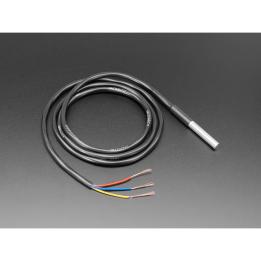
An NTC is a resistor whose value drops as the temperature rises: it is cheap, but it has to be read with a voltage divider and a formula. The TMP36 outputs a voltage proportional to the degrees. The DS18B20 does everything itself and sends the finished number over one wire, even inside a waterproof steel probe.
| Sensor | Output | Stated accuracy | Supply | Good to know |
|---|---|---|---|---|
| NTC 10 kΩ B3950 | resistance | depends on divider and calibration; Adafruit: with Arduino don't count on better than ±0.5 °C | none (passive) | the curve changes from brand to brand |
| TMP36 | voltage, 10 mV/°C, 750 mV at 25 °C | TO-92: ±3 °C max at 25 °C, ±4 °C max over the full range | 2.7–5.5 V, max 50 µA | works at 3.3 V |
| LM35 | voltage, 10 mV/°C, 0 V at 0 °C | ±1 °C max at 25 °C (LM35A: ±0.5 °C) | at least 4 V | not suitable for the ESP32 at 3.3 V |
| DS18B20 | digital, 1-Wire | ±0.5 °C from −10 to 85 °C; ±2 °C outside | 3.0–5.5 V | many probes on the same wire |
| BME280 | I²C or SPI | see text | 1.71–3.6 V | also measures pressure and humidity |
| SHT40 / SHT45 | I²C | ±0.2 / ±0.1 °C typical | 1.08–3.6 V | humidity; built-in heater |
| DHT22 (AM2302) | digital, its own single-wire protocol | ±0.5 °C, range not stated | — | one reading every 2 seconds at most |
Values from the manufacturers' datasheets. The DHT22 protocol is not compatible with the DS18B20's 1-Wire.
The ranges are the operating ranges; the accuracy written in the bar often applies only to part of them. For the BME280, Bosch explains that the temperature is mainly used to compensate pressure and humidity: it is the chip's temperature, includes its self-heating and is usually higher than the surroundings.
Which one to choose
- Air, accurately: SHT4x: ±0.2 °C typical, plus humidity.
- Water, soil, outdoors: waterproof DS18B20 probe; several probes on the same wire, each with its own 64-bit code.
- Weather station: BME280 for pressure and humidity; for air temperature a separate sensor, away from the electronics, is better.
- Lowest cost, or ovens and 3D printers: NTC, with a good fixed resistor and a calibration.
- Simple analog: TMP36, which also works at 3.3 V; the LM35 needs at least 4 V and a negative supply for temperatures below zero.
NTC: two things to watch
The formula. The Beta equation is handy but approximate: with B = 3950, against the table of the Adafruit 4890 thermistor, it is off by about +0.5 °C at 0 °C and +2.2 °C at −40 °C (our own calculation). And “3950” thermistors from different brands do not share the same curve: Adafruit sells two 3950 thermistors with different tables. For wide ranges use your thermistor's table.
Self-heating. With a 10 kΩ + 10 kΩ divider at 5 V the thermistor dissipates 0.625 mW and warms up slightly. Adafruit suggests powering the divider from a pin only while reading.
Wiring: DS18B20 probe on the ESP32
Wires of the DFRobot probe: red to 3.3 V, black to GND, yellow (data) to GPIO 4. Between data and 3.3 V you need a 4.7 kΩ resistor, as in the datasheet diagrams. More probes are connected in parallel on the same three wires.
Sketch: DS18B20
// DS18B20: reads all the probes connected to the same data wire (1-Wire) and prints the temperature of each one.
// Data wire with a 4.7 kohm resistor to VCC. Same sketch for Arduino UNO and ESP32.
// Libraries: OneWire and DallasTemperature.
#include <OneWire.h>
#include <DallasTemperature.h>

#ifdef ARDUINO_ARCH_ESP32
const int PIN_DATI = 4;
#else
const int PIN_DATI = 2;
#endif

OneWire filo(PIN_DATI);
DallasTemperature sonde(&filo);

void setup() {
  Serial.begin(115200);
  sonde.begin();
  Serial.print("Probes found: ");
  Serial.println(sonde.getDeviceCount());
}

void loop() {
  sonde.requestTemperatures();          // they all measure together; at 12 bits it takes up to 750 ms
  for (int i = 0; i < sonde.getDeviceCount(); i++) {
    float gradi = sonde.getTempCByIndex(i);
    Serial.print("Probe ");
    Serial.print(i);
    Serial.print(": ");
    if (gradi == DEVICE_DISCONNECTED_C) {
      Serial.println("not responding");
    } else {
      Serial.print(gradi, 2);
      Serial.println(" C");
    }
  }
  delay(2000);
}
You need the OneWire and DallasTemperature libraries. If you read −127 the probe is not responding; if you read exactly 85.00, that is the DS18B20's power-on value: the conversion did not happen. At 12 bits each conversion takes up to 750 ms; at 9 bits 94 ms are enough, with half-degree resolution.
Sketch: NTC
// 10 kohm NTC thermistor (B 3950) with the Beta equation, as in the Adafruit "Thermistor" guide.
// Divider: 10 kohm fixed resistor between + and the pin, NTC between the pin and GND.
// Same sketch for Arduino UNO and ESP32.
#include <Arduino.h>
#include <math.h>

const float R_FISSA = 10000.0;   // ohm (1% is better)
const float R_NOM = 10000.0;     // NTC resistance at 25 degrees
const float T_NOM = 298.15;      // 25 degrees in kelvin
const float BETA = 3950.0;       // from your thermistor's datasheet

#ifdef ARDUINO_ARCH_ESP32
const int PIN_NTC = 34;
const float VCC_MV = 3300.0;     // divider voltage: measure it on the 3V3 pin and write it here
#else
const int PIN_NTC = A0;
#endif

float resistenzaNtc() {
  float media = 0;
  for (int i = 0; i < 5; i++) {  // average of 5 readings, as in the Adafruit example
#ifdef ARDUINO_ARCH_ESP32
    media += analogReadMilliVolts(PIN_NTC);
#else
    media += analogRead(PIN_NTC);
#endif
    delay(10);
  }
  media /= 5;
#ifdef ARDUINO_ARCH_ESP32
  // the ESP32 ADC does not use the 3.3 V as its reference: we work in millivolts
  return R_FISSA * media / (VCC_MV - media);
#else
  // on the UNO the divider and the ADC use the same 5 V: the ratio is enough
  return R_FISSA / (1023.0 / media - 1.0);
#endif
}

void setup() {
  Serial.begin(115200);
}

void loop() {
  float rNtc = resistenzaNtc();
  // Beta equation: 1/T = 1/T_NOM + ln(R/R_NOM)/B
  float kelvin = 1.0 / (1.0 / T_NOM + log(rNtc / R_NOM) / BETA);
  Serial.print("R = ");
  Serial.print(rNtc, 0);
  Serial.print(" ohm   T = ");
  Serial.print(kelvin - 273.15, 1);
  Serial.println(" C");
  delay(1000);
}
10 kΩ fixed resistor between + and the pin, NTC between the pin and GND. On the UNO the ratio between reading and full scale is enough, because the divider and the converter use the same 5 V. Not on the ESP32: you read in millivolts and need the real voltage of the 3.3 V rail, which you have to measure. On the ESP32, below about 5 °C, the pin goes above the 2.45 V of the accurate range.
Common mistakes
| What happens | Why | Fix |
|---|---|---|
| DS18B20 reads −127 | not responding: the 4.7 kΩ resistor is missing or the data wire is loose | check resistor and wires |
| DS18B20 reads 85.00 | power-on value, no conversion done | check the power supply; don't use parasite mode |
| The BME280 reads higher than the air | it measures the chip, which warms up | separate sensor for air temperature |
| LM35 off with the ESP32 | powered below 4 V | TMP36 or a digital sensor |
| NTC reads a few tenths too high | self-heating in the divider | power the divider only while reading |
| DHT22 gives read errors | read too often | at least 2 seconds between readings |
| SHT4x reads high for a while | built-in heater just used | data taken during and right after heating is not valid |
Useful products
- New
- Made to order

- New
- Made to order
- New
- Made to order

- New
- Made to order

- New
- Made to order

- New
- Made to order

- New
- Made to order

- New
- Made to order

Other guides
- Resistor colour code and tolerances
- N-channel and P-channel MOSFETs
- Bipolar transistor (BJT) or MOSFET?
- Relays: how to drive them and how much current they draw
- THT and SMD/SMT components
- XIAO board pinouts
- LEDs: forward voltage and series resistor
- The multimeter: measuring voltage and current
- Wemos D1 mini: first steps
- MOSFET module with Arduino and ESP32
- Relay module with Arduino and ESP32
- 3D printing filaments: PLA, PETG and fibre-filled versions
- Analog and digital: the differences
- ADS1115: 16-bit converter with Arduino and ESP32
- From bits to real values: converting sensor readings
- DS3231 RTC clock with Arduino and ESP32
- Linear or switching regulator: which one to choose
- Step-down, step-up and buck-boost: choosing the right module
- Voltage divider: reading voltages higher than 5 V or 3.3 V
- Pull-up, pull-down and bounce: wiring a button properly
- 3.3 V and 5 V logic levels: getting an ESP32 and an Arduino to talk
- The I²C bus: addresses, pull-ups and the scanner
- Lithium batteries: voltages, charging and protection
- ESP32 power consumption and deep sleep: how long the battery lasts
- ESP32: which pins to use and which to avoid
- Getting started with the ESP32 in Arduino IDE 2 and PlatformIO
- SSD1306 OLED display and 16×2 I²C LCD with Arduino and ESP32
- PIR motion sensor and HC-SR04 ultrasonic sensor
- Date and time from the Internet with the ESP32: NTP, Italian time zone and daylight saving time
- MicroSD data logger: saving measurements to CSV
- Solar-powered ESP32: panel, charger and the numbers for Italy
- Web server on the ESP32: control a relay from your phone
- Your first LED: wire it up and make it blink
- The button: let Arduino decide
- The potentiometer: turn a knob and read its value
- Soft light: adjusting the brightness of an LED
- The buzzer: playing notes and melodies
- The traffic light: three LEDs in sequence
- The thermometer: reading the temperature with the TMP36
- The servo motor: moving an arm with Arduino
- The night light: the photoresistor and your first decision
- The relay: switching on a light bulb with Arduino
- The LCD display: making Arduino write
- The electronic dice: your first complete project
- The RGB LED: every color from three lights
- The joystick: two-axis control with a shield
- The LED ring: twelve colors from a single pin
- The DC motor: driving it with a MOSFET
- Soil moisture: the plant that asks for water
- The stepper motor: turn exactly as far as you want
- The parking sensor: faster and faster beeps
- The 7-segment display: big, bright numbers
- Automatic watering: the plant that waters itself
- The keypad: a lock with a secret code
- Networked weather station: values and chart on your phone
- A Telegram bot on the ESP32: your home from your phone
- MQTT with the ESP32: the language of connected devices
- Updating the ESP32 over Wi-Fi (OTA)
- ESP-NOW: two ESP32 boards talking without a router
- WebSocket with the ESP32: the LED that follows the slider
- Readings on a Google sheet, with deep sleep
- WiFiManager: choose the Wi-Fi from your phone
- Bluetooth LE with the ESP32: the phone without a network
- The camera in your browser with the ESP32-S3
- A portable Bluetooth speaker you build yourself
- Bluetooth desktop speakers, 2 × 20 W
- Stereo MP3 player with two buttons
- The shelf that plays music: a Visaton exciter
- How to solder well
- How much does it draw? Current and power with the INA219
- Load-cell scale with the HX711
- CO2 traffic light: when to open the windows
- RFID card door opener
- GPS: track logger on microSD
- LoRa: how far does it go? A range test with two boards
- Battery weather sign with an e-paper display
- Web radio with an ESP32 and an I2S amplifier
- Getting started with the Raspberry Pi Pico 2 in MicroPython
- Your first amplifier: the LM386 and a speaker
- Talking Arduino: the DFR0760 speech synthesis module
- The spectrum of your music on an LED matrix
- Drawing with 64 LEDs: the 8×8 matrix with the MAX7219
- A real voltage: the 12-bit MCP4725 DAC
- The heartbeat on Arduino: an ECG with the AD8232